Best Mechanical Keyboards Under Budget: Top Picks for 2026
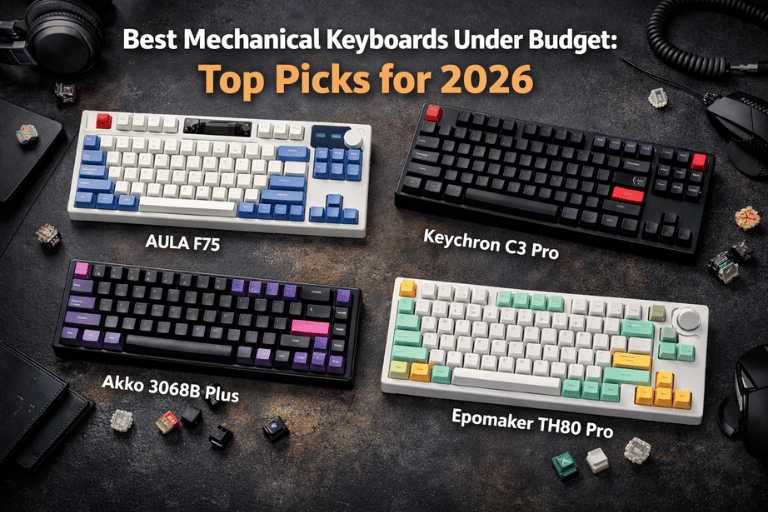
The Best Typing Experience You've Ever Had Doesn't Have to Cost a Fortune
Here's something the mechanical keyboard hobby doesn't always advertise clearly.
The gap between a ₹500 membrane keyboard and a ₹5,000 entry-level mechanical keyboard is enormous — probably the largest quality jump per rupee spent in the entire peripheral market. The gap between a ₹5,000 budget mechanical keyboard and a ₹25,000 enthusiast board is real but considerably smaller, and for most people in most use cases, largely irrelevant.
This is genuinely good news. It means the mechanical keyboard hobby — which has a well-deserved reputation for being an expensive rabbit hole — has a legitimate entry point that delivers 80–85% of the premium experience at 20–25% of the premium price. And in 2026, that entry point has never been better served by the market.
The budget mechanical keyboard space has been transformed over the past three years by manufacturers — primarily Chinese brands like AULA, Epomaker, Keychron, and Akko — who have brought features that were previously exclusive to expensive custom boards down to price points that feel almost unreasonably accessible. Pre-lubed switches. Gasket mounting. Hot-swap PCBs. South-facing RGB. Aluminum cases. Per-key customization via software. These features, any one of which would have been notable on a $100 keyboard five years ago, now appear together in keyboards costing $30–$60.
This guide covers the best budget mechanical keyboards available in 2026 — with specific focus on options like the AULA F75 and EA75 that have earned genuine enthusiasm from the budget keyboard community — alongside alternatives at different price points and form factors for different needs.
What Makes a Budget Mechanical Keyboard Good?
Before the specific keyboards, understanding what separates a genuinely good budget board from a cheap one — because not all budget keyboards are created equal, and the differences matter.
Switch quality and replaceability. The switch is the most critical component of a mechanical keyboard's feel and sound. Budget boards increasingly come with decent pre-installed switches, but the feature that matters most is hot-swappability — the ability to pull switches out and replace them without soldering. Hot-swap capability turns a good budget keyboard into a platform that can evolve as your preferences develop.
Mounting style. How the PCB connects to the case determines how the keyboard feels when you type on it. The progression from worst to best in terms of typing feel: tray mount (cheapest, hardest feel) → top mount → bottom mount → gasket mount (softest, most premium feel). Gasket mounting on budget boards was rare three years ago. In 2026, it appears on keyboards under ₹4,000.
PCB and RGB orientation. South-facing LEDs (beneath the switch, facing downward) produce cleaner RGB shine-through on keycaps than north-facing LEDs, which can cause interference with Cherry-profile keycap legends. This was a premium feature. Budget boards increasingly get it right.
Build quality and weight. An aluminum case costs more to produce than plastic but dramatically changes the premium feel and sound of the board. Budget aluminum-case keyboards are a specific category worth seeking out.
Software. Per-key remapping and macro programming via reliable software transforms a keyboard's utility. QMK/VIA compatibility — the open-source keyboard firmware standard — is the gold standard for customization and beats proprietary software consistently.
The Keyboards: Best Budget Picks for 2026
1. AULA F75 — The Budget Board That Changed the Conversation
Form factor: 75% | Price: ₹3,500–₹5,000 / $40–$60 | Connection: Wired/Wireless (2.4GHz/Bluetooth/USB-C)
The AULA F75 is the keyboard that most clearly demonstrates how much the budget mechanical keyboard market has changed. When it appeared, the combination of features it offered at its price point was genuinely startling to enthusiasts who had been spending significantly more to get comparable specifications.
What makes it stand out:
The F75 comes in a 75% form factor — the layout that most experienced keyboard users eventually converge on as the sweet spot between functionality and desk space. You keep the function row, the arrow keys, and a navigation cluster, while eliminating the numpad and the excessive spacing of a full-size board. The resulting footprint is compact without sacrificing daily usability.
The tri-mode wireless — 2.4GHz for gaming-grade low latency, Bluetooth for multi-device switching (up to 3 devices), and USB-C wired — makes it one of the most versatile connectivity options at any price. The 2.4GHz dongle produces wireless latency indistinguishable from wired for all practical purposes, including competitive gaming.
Gasket mounting on a keyboard at this price is remarkable. The PCB sits on silicone gaskets rather than being screwed directly to the case, producing a softness and flex to the typing feel that purely budget tray-mount boards simply cannot match. It sounds better and feels better.
The switches come pre-lubed from the factory — a detail that costs time and money when done aftermarket — and the hot-swap PCB means you're not locked into whatever comes installed. The F75 supports 3-pin and 5-pin switches universally.
South-facing RGB with per-key customization via AULA's software (improving with each firmware update) and a decent aluminum top plate give the board a visual and tactile premium that the price doesn't suggest.
The honest caveats: AULA's software has historically been less polished than the hardware deserves — functional, but not as smooth as dedicated enthusiast firmware. Battery life at 3,000mAh is adequate (rated at approximately 4,000 hours with RGB off) but not exceptional compared to dedicated wireless keyboards. The stock stabilizers benefit from some lubing for the best sound and feel, which is a small additional investment of time.
Best for: Someone wanting a versatile, genuinely premium-feeling first mechanical keyboard with wireless functionality, in the form factor that most professionals use long-term.
2. AULA F68 / EA75 — The Compact Premium Alternative
Form factor: 65–75% | Price: ₹3,000–₹4,500 / $35–$55 | Connection: Wired/Wireless
The EA75 (from Epomaker, sometimes listed as EA or EC branded) sits in the same competitive space as the AULA F75 and deserves consideration as an alternative for specific preferences.
The EA75 targets the 75% market with a slightly different aesthetic and build approach — aluminum case construction that feels notably premium for its price, south-facing RGB, and hot-swap PCB with gasket mounting. The sound profile tends to be slightly different from the F75 — more thocky (a satisfying low-pitched sound prized by keyboard enthusiasts) rather than clicky, depending on the switch selection.
The AULA F68, a 65% sibling to the F75, deserves mention for those who specifically want a smaller footprint. It drops the dedicated function row while retaining arrow keys — the minimal layout that many programmers and writers prefer for maximum desk space. The F68 shares the F75's wireless capability, gasket mounting, and hot-swap PCB in a smaller package.
Why consider the EA75 over the F75:
- Slightly more consistent build quality reports from early production batches
- Different aesthetic that some prefer
- Sometimes better switch options included in specific regional releases
- Sound profile differences that are subjective but real
Why the F75 might still win: Software support has been more actively updated, and the wireless implementation is well-regarded.
Best for: Someone who has compared both and prefers the EA75's specific sound profile or aesthetic; 65% form factor preference for the F68.
3. Keychron C3 Pro — The Gateway Keyboard
Form factor: TKL (87 keys) | Price: ₹4,000–₹5,500 / $35–$50 | Connection: Wired USB-C
Keychron has earned a reputation for building excellent first mechanical keyboards, and the C3 Pro is the most accessible entry point in their lineup.
The C3 Pro is wired-only — which is the primary trade-off for the price — but what it delivers for that concession is a well-built TKL (tenkeyless — no numpad) board with hot-swap capability, Keychron's excellent QMK/VIA compatibility, and a switch selection that includes genuine Gateron options at entry-level pricing.
QMK/VIA compatibility is the C3 Pro's signature advantage over pure budget competition. QMK is the most powerful open-source keyboard firmware available — it supports per-key remapping, complex macros, RGB lighting control, multiple layers, and essentially unlimited customization without proprietary software dependency. For a keyboard you're going to use daily for years, this future-proofing is valuable.
The build is solidly plastic — no gasket mounting, no aluminum case — but it's well-assembled with a reasonable sound profile out of box. The TKL layout retains function keys and a navigation cluster, making it the familiar full-featured experience for people coming from standard keyboards.
The honest assessment: The C3 Pro isn't the most exciting keyboard on this list. It's the most sensible one — reliable, well-supported, with firmware that will be updated for years and a community large enough that any issue you encounter has a documented solution.
Best for: First mechanical keyboard buyers who want reliability and future-proofing over features; TKL layout preference; anyone who wants QMK/VIA at the lowest possible price.
4. Akko 3068B Plus / 5075B — Feature-Dense Budget Options
Form factor: 65% / 75% | Price: ₹4,500–₹7,000 / $45–$70 | Connection: Wired/Wireless
Akko has built a strong reputation in the budget-to-mid-range keyboard space by consistently delivering more features per dollar than the competition, and the 3068B Plus and 5075B represent their best current offerings at the lower end of their range.
Akko 3068B Plus (65% wireless): The 65% form factor — arrow keys, a small navigation cluster, no function row — in a wireless package with hot-swap PCB and Akko's own switches (the Akko CS Jelly series in particular has received strong reviews for a smooth, light linear feel). Bluetooth multi-device and 2.4GHz wireless. The battery life is notably strong — 3,000mAh with efficient power management produces real-world battery life that outlasts most competitors.
Akko 5075B (75%): A step up in build quality with a more premium case, gasket-adjacent mounting (silicone padding rather than true gasket but producing similar sound dampening), and Akko's improved software. The 5075B sits at the upper end of the budget category but consistently earns its price in build quality terms.
Akko's in-house switches are genuinely impressive at the price — particularly the Akko CS Lavender Purple (tactile) and Akko CS Jelly Pink (linear), which come factory lubed to a level that budget switches from other brands often don't match.
Best for: Budget buyers who want Akko's specific switch options, strong battery life in wireless models, or the 65% layout specifically.
5. Royal Kludge RK84 / RK61 — The Accessible Entry Point
Form factor: 75% / 60% | Price: ₹2,500–₹4,000 / $28–$45 | Connection: Wired/Wireless
Royal Kludge occupies the lowest price tier of mechanical keyboards that are still genuinely worth recommending — the entry point for people who want to try mechanical keyboards without significant financial commitment.
The RK84 (75% layout) and RK61 (60% layout) are Royal Kludge's most popular models. They offer wireless connectivity (Bluetooth + wired, with some models adding 2.4GHz), hot-swap PCBs on the newer versions, and RGB lighting at prices that are genuinely affordable.
The honest assessment of Royal Kludge: The value is real but so are the compromises. Build quality is noticeably below AULA and Akko at comparable price points — more plastic flex, less consistent stabilizer quality from unit to unit, software that is functional but basic. The switches included (RK's proprietary switches or Gateron on some versions) are acceptable but benefit significantly from replacement, which the hot-swap PCB enables.
Where Royal Kludge earns its place: for someone who genuinely cannot spend more than ₹3,000 on a keyboard but wants to experience mechanical switches with wireless connectivity, the RK84 is the best option at that price point. Set expectations accordingly and it delivers well. Compare it to a ₹5,000 AULA and it doesn't.
Best for: Absolute beginners who want the lowest possible entry point; first mechanical keyboard with wireless; budget that cannot stretch to ₹4,500+.
6. Epomaker TH80 Pro / RT100 — The Enthusiast-Influenced Budget Pick
Form factor: 75% / 100% retro | Price: ₹5,000–₹8,000 / $55–$85 | Connection: Wired/Wireless
Epomaker has consistently punched above its price class by incorporating enthusiast design decisions into budget-adjacent pricing, and the TH80 Pro and RT100 represent their most interesting recent offerings.
The TH80 Pro is a 75% wireless keyboard with a genuine south-facing RGB implementation, hot-swap PCB, and what Epomaker calls a "leaf spring mounting" — a mounting system that produces keyboard flex and sound characteristics closer to gasket mounting than the tray mounts typical at this price. The typing feel is notably premium.
The Epomaker RT100 is the more unusual choice — a retro-styled full-size keyboard with a knob, display screen, and design aesthetic inspired by vintage computers. It's not for everyone, but for someone who wants a full-size layout with genuine personality, the RT100 delivers at a price that the design would suggest should be higher.
Best for: Budget buyers who want enthusiast-adjacent mounting systems without paying enthusiast prices; anyone attracted to Epomaker's specific design aesthetic.
Switch Guide: What Comes in These Keyboards and What to Know
Most budget keyboards ship with a choice of switch types. The three categories matter:
| Switch Type | Feel | Sound | Best For |
|---|---|---|---|
| Linear (Red/Yellow) | Smooth, no bump | Quieter, can be thocky | Gaming, fast typists |
| Tactile (Brown/Purple) | Bump at actuation point | Moderate | Typing and gaming balance |
| Clicky (Blue/Green) | Bump + audible click | Loud, satisfying click | Typists who want feedback |
For office environments: Linear or tactile — clicky switches are genuinely disruptive to others.
For gaming: Linear — the smooth, consistent actuation is preferred for rapid repeated keypresses.
For typing satisfaction: Tactile — the feedback confirms each keystroke without the noise of clicky switches.
The switches in budget keyboards are not as refined as premium options, but the hot-swap PCBs that most of these keyboards include mean you're not locked in. A set of Gateron G Pro switches, Akko CS switches, or Durock linears — all available for ₹1,500–₹3,000 for a full set — transforms the feel of any hot-swap board significantly.
Budget Comparison Table
| Keyboard | Form Factor | Price (approx.) | Wireless | Hot-Swap | Mounting | Best For |
|---|---|---|---|---|---|---|
| AULA F75 | 75% | ₹4,000–₹5,000 | Yes (tri-mode) | Yes | Gasket | Best all-rounder |
| EA75 | 75% | ₹3,500–₹4,500 | Yes | Yes | Gasket | F75 alternative |
| Keychron C3 Pro | TKL | ₹4,000–₹5,500 | No | Yes | Top mount | QMK/reliability |
| Akko 3068B Plus | 65% | ₹4,500–₹6,000 | Yes | Yes | Gasket-adjacent | Akko switches |
| Royal Kludge RK84 | 75% | ₹2,500–₹3,500 | Yes | Yes (newer) | Tray | Tightest budget |
| Epomaker TH80 Pro | 75% | ₹5,500–₹7,000 | Yes | Yes | Leaf spring | Enthusiast feel |
Form Factor Guide: Which Layout Is Right for You?
The form factor decision is more important than any switch or feature decision, because it determines the daily ergonomics of your setup and cannot easily be changed after purchase.
Full Size (100%): Every key including numpad. Best if you regularly use number-heavy data entry. Takes the most desk space. Least common choice among mechanical keyboard enthusiasts because the numpad pushes the mouse further right.
TKL / 87% (Tenkeyless): Removes the numpad. Keeps function row, arrow keys, and navigation cluster. The most natural transition from a standard keyboard. Best for people who don't use the numpad but want full functionality.
75%: Removes the numpad and compresses the navigation cluster next to the main cluster. Keeps function row and arrow keys in reduced footprint. The sweet spot for most users — maximum functionality in minimum space. The AULA F75 and most of this guide's picks use this layout.
65%: Removes function row in addition to numpad. Keeps arrow keys and a small navigation cluster. Preferred by programmers and writers who use function keys through Fn combinations and value the smaller footprint.
60%: Removes function row and navigation cluster. Only alphanumeric keys, modifiers, and arrows (sometimes). Maximum portability and desk space. Requires Fn-layer use for function keys and navigation. Popular with minimalist enthusiasts; harder adaptation from standard keyboards.
Keycap and Upgrade Path
Budget keyboards come with keycaps that range from adequate to genuinely good. The keycap situation on most of the boards listed here is functional — PBT plastic (more durable and less prone to shine than ABS) on the better budget options, with reasonable legend clarity.
The upgrade path for a budget mechanical keyboard is genuinely accessible and transforms the board:
Keycaps: A set of quality PBT double-shot or dye-sub keycaps from Akko, YMDK, or Epomaker costs ₹1,500–₹3,500 and dramatically changes the look and feel of any board. Akko's keycap sets in particular are excellent value.
Switch replacement: Hot-swap PCBs make this tool-free. A set of Gateron G Pro linears, Durock L7s, or Akko CS switches in a preferred weight costs ₹1,500–₹3,000 and is the single most impactful upgrade to typing feel.
Stabilizer lubing: The larger keys — spacebar, shift, backspace, enter — use stabilizers that benefit significantly from lubing with Krytox 205g0 or Dielectric Grease. This is a 30-minute process that eliminates rattle and produces the clean, consistent sound that makes premium keyboards sound the way they do.
The Honest Recommendation
For the majority of people reading this guide — whether you're a student, a working professional, a gamer, or someone who has simply been suffering on a membrane keyboard long enough — the AULA F75 is the recommendation. It is the keyboard that most consistently delivers the combination of wireless versatility, premium mounting feel, hot-swap convenience, and genuine build quality at a price that makes the decision easy.
If wireless isn't a priority and QMK/VIA compatibility matters more, the Keychron C3 Pro is the more principled choice — less exciting, more reliable, better software support long-term.
If the budget absolutely cannot stretch above ₹3,000, the Royal Kludge RK84 is the honest recommendation for that constraint — not perfect, but genuinely worth the money at its price point.
Buy the board. Change the switches if the stock ones don't feel right. Buy a keycap set when the budget allows.
And then stop looking at keyboard subreddits, because that is where wallets go to die and the rabbit hole has no bottom.
Which keyboard on this list are you going with — and what form factor are you picking? Drop your setup in the comments, and share this with whoever is still typing on a membrane keyboard and deserves better.
