Minimal Desk Setup: Best Accessories for Productivity
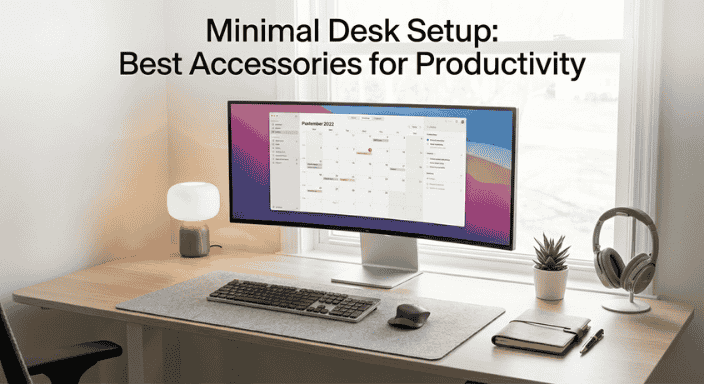
Your desk is a disaster. Tangled cables drape across the surface like vines. Multiple chargers compete for outlet space. Papers, sticky notes, and random tech accessories create visual chaos. Your laptop sits at an awkward angle, forcing you to hunch over like Gollum protecting his precious. A coffee mug from three days ago has achieved sentience in the corner.
You know a clean desk would help you focus, but every "minimal desk setup" you see online looks sterile and impractical—beautiful photos featuring a single MacBook on an empty desk with a succulent for "personality." That's not a workspace; it's a magazine spread. Real work requires tools, peripherals, accessories—things that inherently create clutter.
The question isn't whether to have accessories—it's which ones actually enhance productivity without destroying the clean aesthetic and mental clarity that minimalism provides. You need the sweet spot: a desk that's functional enough to support serious work but minimal enough to maintain focus and calm.
This is that guide. We'll build a genuinely productive minimal desk setup—identifying the essential accessories, eliminating the unnecessary, and creating a workspace that helps you work better, not just look better.
The Minimal Desk Philosophy
Before buying anything, understand what minimalism means for a workspace:
Minimalism ≠ Empty
Minimalism isn't about owning the least possible. It's about owning only what serves a purpose and eliminating everything that doesn't. A desk with five carefully chosen tools that you use daily is more minimal than a desk with two decorative objects that serve no function.
Function Over Form (But Both Matter)
The best minimal setups combine utility with aesthetics. An accessory earns its place by either:
- Directly improving productivity
- Reducing friction in your workflow
- Solving a specific problem
- Maintaining the visual calm that helps you focus
The One-In, One-Out Rule
Before adding anything new, ask: "What does this replace or what problem does it solve that isn't currently solved?" If you can't answer clearly, you don't need it.
Quality Over Quantity
Ten cheap accessories create clutter and break frequently. Three well-made tools last years and perform better. In minimal setups, quality matters more because each piece is visible and used constantly.
The Foundation: Desk and Chair
These aren't accessories, but they determine everything else, so let's establish the baseline:
Desk Requirements:
Size: 120-150cm wide, 60-75cm deep provides enough workspace without dominating the room. Smaller than 120cm feels cramped. Larger than 150cm encourages clutter accumulation.
Surface: Solid color (white, black, natural wood) without patterns or textures that create visual noise. Smooth surface for easy cleaning.
Design: Clean lines, minimal ornamentation, no built-in organizers or hutches (they collect clutter). Simple rectangular or L-shaped designs work best.
Cable management: Built-in cable routing, grommets, or undersides that accommodate cable trays. Essential for maintaining the clean look.
Material matters: Solid wood or quality laminate. Avoid cheap particleboard—it warps and looks progressively worse.
Recommendations:
- IKEA Bekant (₹15,000-25,000): Adjustable height, clean design, cable management
- Fully Jarvis (₹40,000-60,000): Premium standing desk, excellent build
- IKEA Karlby + Alex Drawers (₹12,000-18,000): Budget classic, infinitely customizable
Chair (The Most Important Investment):
You'll spend 6-10 hours daily in this chair. Cheap chairs destroy posture, cause back pain, and reduce productivity. A good chair is a long-term health investment.
Essential features:
- Adjustable height
- Lumbar support (adjustable preferred)
- Adjustable armrests
- Tilt mechanism
- Breathable material (mesh backs superior for comfort)
- Stable base (aluminum, not plastic)
Recommendations:
- Steelcase Leap (₹80,000-100,000): Gold standard, 12-year warranty
- Herman Miller Aeron (₹90,000-120,000): Iconic, ergonomic perfection
- Autonomous ErgoChair (₹25,000-35,000): Budget ergonomic option
- IKEA Markus (₹15,000): Entry-level ergonomic chair
The Minimalist Choice: Spend on the chair. The desk can be basic. The chair affects your health and comfort every single day.
Essential Accessories: The Core Setup
1. Monitor (or Laptop Stand)
Why Essential:
Laptop screens force you to look down, destroying neck and back posture. Raising the screen to eye level transforms comfort and reduces strain.
Option A: External Monitor ($150-500)
Ideal specs:
- 24-27 inches (larger than 27" for normal desk depth creates neck strain from side-to-side movement)
- 1440p resolution (2560x1440)—sweet spot between sharpness and price
- IPS panel for color accuracy and viewing angles
- VESA mount compatible for arm mounting
- Minimal bezels and clean stand
Why this matters: External monitors provide more screen real estate, eliminating constant window switching. Productivity increases 20-30% with dual-screen setups according to studies.
Recommendations:
- Dell UltraSharp U2723DE (₹35,000): Professional-grade, USB-C hub built-in
- LG 27UP850 (₹30,000): 4K option, USB-C, height-adjustable
- BenQ GW2480 (₹12,000): Budget 24" 1080p option
Option B: Laptop Stand ($20-80)
If you're committed to single-screen laptop use, elevate it to eye level.
Recommendations:
- Rain Design mStand (₹6,000): Aluminum, stable, beautiful, cable routing
- Roost Stand (₹5,500): Portable, adjustable height, collapses for travel
- IKEA Elloven (₹600): Budget bamboo stand, surprisingly solid
The Minimal Choice: External monitor creates more screen space but adds visual bulk. Laptop stand maintains the "one device" minimalism but limits screen real estate. Choose based on your work—multitasking heavy users need monitors; focused single-task workers can stay laptop-only.
2. Monitor Arm (If Using External Monitor)
Why Essential:
Monitor arms free up desk space, enable perfect positioning, and maintain the clean look by eliminating bulky stands.
Key features:
- Gas spring for smooth adjustment
- VESA 75/100 compatibility
- Cable management channels
- Stable (no wobble during typing)
- Clamp or grommet mounting
Recommendations:
- Ergotron LX (₹12,000): Industry standard, smooth movement, lifetime warranty
- Amazon Basics Monitor Arm (₹8,000): Ergotron OEM at lower price
- NB North Bayou F80 (₹3,500): Budget option, decent quality
The Impact: Removing the monitor stand reclaims 30-40cm of desk depth, creating breathing room and enabling the monitor to sit further back (reducing eye strain).
3. Keyboard and Mouse
The Minimal Philosophy:
Wireless eliminates cable clutter. Quality switches and sensors improve typing feel and precision. Compact layouts reduce desk footprint.
Keyboard Options:
Mechanical (For Typing-Heavy Work):
Mechanical keyboards offer superior tactile feedback and durability but are larger and often noisier.
Recommendations:
- Keychron K8 Pro (₹10,000): Wireless, mechanical, compact, customizable
- Logitech MX Keys (₹10,000): Low-profile, wireless, backlit, quiet
- NuPhy Air75 (₹8,000): Ultra-thin mechanical, aesthetic, wireless
Compact/Minimalist:
Smaller layouts (75%, 65%, 60%) eliminate number pads and navigation clusters, reducing footprint.
Recommendations:
- Apple Magic Keyboard (₹9,000): Minimal aesthetic, perfect for Mac users, rechargeable
- Logitech K380 (₹2,500): Budget wireless, compact, multi-device
- Keychron K3 (₹6,000): Low-profile mechanical, wireless, compact
The Minimal Choice: Wireless + compact form factor. Choose between mechanical (better feel, louder, larger) and membrane/scissor switches (quieter, thinner, simpler).
Mouse Options:
For Productivity:
Ergonomic shape, precise sensor, multiple programmable buttons, wireless.
Recommendations:
- Logitech MX Master 3S (₹9,000): Productivity king, ergonomic, customizable, multi-device
- Razer Pro Click Mini (₹5,500): Compact, wireless, clean aesthetic
- Logitech MX Anywhere 3 (₹6,500): Travel-friendly, precise, compact
For Minimalists:
Simple, clean design without excessive buttons or RGB lighting.
Recommendations:
- Apple Magic Mouse (₹7,000): Minimal aesthetic, gesture support, rechargeable
- Logitech Pebble (₹1,500): Budget minimal design, quiet clicks, wireless
The Minimal Choice: Wireless is non-negotiable for cable management. Choose ergonomic productivity mouse (MX Master) or simple minimal design (Magic Mouse/Pebble) based on usage intensity.
4. Cable Management Solutions
Why Essential:
Cables destroy minimal aesthetics faster than anything else. Comprehensive cable management separates minimal desks from cluttered ones.
Cable Management Arsenal:
Under-Desk Cable Tray ($15-30):
Mounts under desk, hiding power strips and excess cable length.
Recommendations:
- IKEA Signum (₹800): Wire management horizontal rack
- J Channel Cable Raceway (₹1,200): Enclosed tray, hides cables completely
Cable Clips and Guides ($5-15):
Adhesive clips route cables along desk edges and legs.
Recommendations:
- Anker Magnetic Cable Holder (₹600): Magnetic clips for quick cable removal
- Cable Clips (₹300): Simple adhesive cable organizers
Cable Sleeves ($10-20):
Wrap multiple cables into single sleeve, reducing visual clutter.
Recommendations:
- Alex Tech Cable Sleeve (₹800): Neoprene, flexible, multiple sizes
- D-Line Cable Tidy (₹500): Split design, easy installation
Velcro Cable Ties ($5):
Secure excess cable length into neat loops.
The System:
- Power strip in cable tray under desk
- All cables routed through sleeves from devices to tray
- Excess cable length coiled with velcro ties inside tray
- Only necessary cable lengths visible on desk surface
- Clips guide cables along desk legs and edges
Result: Zero visible cables on or around desk. Everything routes underneath and out of sight.
5. Desk Lamp
Why Essential:
Proper lighting reduces eye strain, improves focus, and creates ambiance. Overhead lighting alone is insufficient for desk work.
Key Features:
- Adjustable arm for positioning
- Adjustable color temperature (warm for evening, cool for daytime)
- Adjustable brightness
- Stable base (won't tip)
- Minimal design (avoid excessive ornamentation)
Recommendations:
- BenQ ScreenBar Halo (₹12,000): Mounts on monitor, space-saving, auto-dimming
- Xiaomi Mi LED Desk Lamp (₹3,500): Minimalist design, app control, adjustable temperature
- IKEA Tertial (₹1,200): Budget classic, adjustable arm, clamp mount
- Dyson Lightcycle (₹50,000): Premium option, intelligent lighting, beautiful design
The Minimal Choice: ScreenBar-style monitor lights save desk space entirely by mounting on the monitor. Traditional desk lamps require desk real estate but offer more flexibility.
6. Wireless Charging Pad or Hub
Why Essential:
Eliminates phone charging cables cluttering the desk. Provides dedicated phone spot reducing "where's my phone" moments.
Options:
Simple Charging Pad ($15-40):
Recommendations:
- Anker PowerWave (₹2,000): Reliable, affordable, fast charging
- Belkin Boost Charge (₹3,500): Premium build, case-friendly
Multi-Device Hub ($50-150):
Charges phone, watch, earbuds simultaneously.
Recommendations:
- Anker 3-in-1 Cube (₹8,000): iPhone + Watch + AirPods, compact cube design
- Belkin 3-in-1 (₹10,000): Premium option, adjustable angles
The Minimal Choice: Single wireless pad maintains simplicity. Multi-device hub reduces total desk items if you charge multiple devices daily.
7. Headphones or Earbuds
Why Essential:
Focus requires eliminating distractions. Quality audio gear with noise cancellation creates productive isolation in noisy environments.
Over-Ear (Better Sound and Comfort):
Recommendations:
- Sony WH-1000XM5 (₹30,000): Best ANC, excellent sound, comfortable
- Bose QuietComfort Ultra (₹35,000): Superior comfort, great ANC
- Soundcore Q45 (₹8,000): Budget option, good ANC, 50-hour battery
Earbuds (More Minimal Footprint):
Recommendations:
- Apple AirPods Pro 2 (₹25,000): Best for iPhone users, excellent ANC
- Sony WF-1000XM5 (₹20,000): Best sound quality, great ANC
- Nothing Ear (2) (₹8,000): Budget option, transparent design aesthetic
Storage: Wall-mounted headphone hook (₹500) or under-desk headphone hanger (₹800) keeps them accessible but off the desk surface.
Optional but Valuable Accessories
8. Notepad and Pen
The Analog Exception:
Even minimal digital setups benefit from analog capture for quick notes, sketches, or brainstorming without screen distraction.
Minimal Implementation:
- Single small notebook (A6 or pocket size): Leuchtturm1917 (₹1,200) or Moleskine (₹1,000)
- One quality pen: Pilot G2 (₹100), Muji Gel Ink (₹80), or Lamy Safari (₹2,500)
- Storage: Small desk drawer or minimal pen cup
The Rule: One notebook and one pen. When the notebook fills, archive it and start fresh. No collection of half-used notebooks.
9. Desk Mat
Why Consider:
Protects desk surface, defines workspace, dampens keyboard and mouse noise, adds subtle texture.
Minimal Criteria:
- Solid color (no patterns, logos, or graphics)
- Large enough for keyboard + mouse
- Quality material (leather, felt, cork—not cheap rubber)
- Subtle, not attention-grabbing
Recommendations:
- Grovemade Desk Pad (₹8,000): Premium wool felt, beautiful
- Orbitkey Desk Mat (₹6,000): Recycled materials, document hideaway feature
- IKEA Skrutt (₹600): Budget leather alternative
The Minimal Choice: Skip it if your desk surface is quality wood or smooth finish. Add it if you want surface protection or noise dampening.
10. Small Plant
Why Consider:
Studies show plants improve focus, reduce stress, and increase productivity. They also add organic texture to otherwise technology-dominated spaces.
Minimal Criteria:
- Single plant (not a collection)
- Low maintenance (succulents, snake plant, pothos)
- Small size (doesn't dominate desk)
- Minimal pot (simple ceramic or terracotta, solid color)
Recommendations:
- Snake Plant (Sansevieria): Nearly indestructible, thrives on neglect
- Pothos: Trailing plant, air-purifying, forgiving
- Small Succulent: Minimal water needs, compact
Placement: Corner of desk or window sill—visible but not central.
The Rule: One plant only. More plants = less minimal.
11. USB Hub or Dock
Why Essential (for some):
Modern laptops have limited ports. Hubs consolidate connections, reducing cable clutter.
Types:
Simple USB Hub ($20-50):
Expands USB ports for peripherals.
Recommendations:
- Anker 7-Port Hub (₹3,000): Powered, multiple ports
- UGREEN USB-C Hub (₹2,000): Compact, multiple USB-A and USB-C
Laptop Dock ($100-300):
Single cable connection providing power, display, and peripherals.
Recommendations:
- CalDigit TS4 (₹35,000): Premium, 18 ports, 98W power delivery
- Anker 777 (₹25,000): Comprehensive, reliable, good value
- UGREEN Revodok (₹15,000): Budget option, solid performance
The Minimal Choice: Docks create single-cable laptop connection, dramatically reducing desk clutter. Essential if you frequently connect/disconnect laptop.
12. Whiteboard or Cork Board (Wall-Mounted)
Why Consider:
Offloads visual task management from desk surface to wall, maintaining desk clarity while preserving visibility.
Minimal Implementation:
- Small size (60x40cm maximum)
- Wall-mounted (above desk or adjacent wall)
- Frameless or minimal frame (no decorative borders)
- Single purpose: Active tasks only, not long-term storage
Recommendations:
- IKEA Spontan (₹800): Magnetic board, frameless
- Amazon Basics Cork Board (₹1,200): Simple, functional
- Whiteboard Wallpaper (₹2,000): Entire wall becomes whiteboard
The Rule: Clear it weekly. If items stay longer than a week, they belong in digital task management, not on the board.
What to Avoid: Desk Clutter Traps
❌ Desk Organizers and Caddies:
Ironic truth: organizers create clutter. They become junk collectors for items that shouldn't be on your desk anyway. If something needs organizing, it probably doesn't need to be on your desk.
❌ Multiple Monitors (Unless Essential):
Two monitors double productivity for some workflows (coding, video editing, data analysis). For most people, they're overkill and create visual clutter. Be honest about whether you need two screens or just want them.
❌ Decorative Objects:
That collection of action figures, the stack of design books you don't reference, the artisanal desk toy—each adds visual noise. One plant or one small meaningful object maximum.
❌ Excessive Stationery:
You don't need 12 pens, 5 highlighters, and 3 staplers. One pen, one notebook. Everything else goes in a drawer.
❌ Speakers (Usually):
Large speakers consume desk space. Quality headphones provide better sound with zero desk footprint. Skip speakers unless you genuinely listen to music without headphones regularly.
❌ Coffee Cup Collections:
One cup on desk during use, then immediately to kitchen. No collections of empty or half-full cups.
The Minimal Desk Setup: Final Configuration
The Essential Setup ($300-800):
- Quality chair
- Laptop stand OR external monitor
- Wireless keyboard and mouse
- Cable management system
- Desk lamp
- Wireless charging pad
- Headphones
- One notebook + one pen
The Premium Setup ($1,500-3,000):
- Ergonomic chair (Steelcase/Herman Miller)
- External monitor + monitor arm
- Premium keyboard (mechanical wireless)
- Premium mouse (MX Master)
- Comprehensive cable management
- Premium desk lamp (ScreenBar or Dyson)
- Multi-device charging hub
- Premium headphones (Sony/Bose)
- Quality desk mat
- Laptop dock
The Absolute Minimal Setup ($150-300):
- Budget chair with lumbar support
- Laptop stand
- Wireless keyboard and mouse
- Basic cable clips
- Budget desk lamp
- Headphones
The Maintenance System: Staying Minimal
Daily:
- Clear desk completely at end of day
- Return all items to designated spots
- Wipe down surface
Weekly:
- Cable check—ensure nothing new has appeared
- Drawer audit—remove items that don't belong
- Plant watering (if applicable)
Monthly:
- Question every item on or around desk
- Remove anything unused in past 30 days
- Deep clean all surfaces
Quarterly:
- Major audit—be ruthless
- Update accessories if needs have changed
- Reorganize cable management
The Bottom Line
A minimal desk setup isn't about deprivation—it's about intention. Every item should serve a clear purpose, improve productivity, or maintain the mental clarity that focused work requires.
The best minimal desk contains exactly what you need and nothing you don't. It's clean enough to provide visual calm, functional enough to support serious work, and personal enough to feel like yours.
Start with the essentials. Add only what genuinely solves problems. Ruthlessly eliminate what doesn't serve you. Invest in quality for items you use daily. Manage cables obsessively. Clear your desk completely each night.
Do this, and you'll create not just an Instagram-worthy workspace, but a genuinely productive environment where you do your best work—focused, calm, and free from the visual noise that clutters both desks and minds.
Your desk should be a tool for thought, not a monument to accumulation. Keep it minimal, keep it functional, and let the work speak for itself.
